Sans Serif
Afacad Flux
Use Afacad Flux in your designs with Andalusi, a professional Arabic typeface ready to apply to any template.
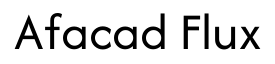
Loading font...
Uses for Afacad Flux
✍️
Calligraphy and art
Use Afacad Flux for calligraphy work and art prints.
🎨
Design templates
Apply Afacad Flux to Andalusi templates for posts, cards and logos.
💼
Branding and logos
Put Afacad Flux to work in your brand logo and visual identity.
Simple steps
How do you start?
- 1
Open Andalusi and start a project
Download the Andalusi app and open a new project or pick a ready-made template.
- 2
Search for Afacad Flux
Tap the text tool, open the font list and search for "Afacad Flux", then select it.
- 3
Add your text and export
Type your text, set the size and color, then export the design as PNG or JPG.
Frequently asked questions
How do I use Afacad Flux in Andalusi?
Open the app, add a text element to your design, then tap the current font name to open the library and choose "Afacad Flux".
Is Afacad Flux free in Andalusi?
Most Andalusi fonts are free for all users. The advanced exclusive families are included with a Pro or Max subscription.
Can I download Afacad Flux as a TTF file?
No. Afacad Flux is built into the Andalusi app and applies straight to your design, so there is no font file to download or install.
Does Afacad Flux support the full Arabic alphabet?
Yes. Afacad Flux supports the full Arabic alphabet including diacritics, harakat and connected letterforms.
Can I use Afacad Flux in commercial designs?
Yes. Every Andalusi font including Afacad Flux is licensed for personal and commercial use across social media, logos and print.